
Installation & cutting software · Estonia
PPF Engine: Could 3D Scanning Solve the Missing PPF Pattern Problem?
New software from Estonia aims to help installers make their own paint protection film cutting templates for rare vehicles, aftermarket parts and panels that aren't in the usual pattern libraries. A real STEK Estonia installation shows how the idea works—and why the details matter.
A customer brings a truck into a paint protection film shop. The truck itself is common enough, and the shop's cutting software probably has plenty of patterns for it. But the customer has added a set of aftermarket fender flares. Those parts are not in the pattern database.
The installer now has a choice: make the shape by hand, spend time searching for another source, or leave those parts out of the job. That gap between the vehicle in the bay and the patterns on the screen is the problem PPF Engine is trying to solve.
Rather than offering another large catalog of premade vehicle templates, PPF Engine is designed to help a shop create a new pattern from a 3D scan of the actual part. It measures the curved surface, helps the installer decide where the film should start and stop, and turns that work into a flat file a compatible plotter can cut.
The software is being developed by Andify OÜ in Tartu, Estonia. As of November 5, 2026, it is taking preorders, with installer access estimated for December. That makes this an early look at a promising workflow—not a review of a publicly released product.
What makes this different from a normal PPF cutting database?
Most PPF shops already know the familiar approach covered in our pattern-cutting software directory: choose the vehicle, choose the panel, make any available adjustments, then cut the film. For popular cars, that can be a fast, practical way to work.
The problem begins when the vehicle is too new, the trim is unusual, the body has been modified or the customer wants coverage that isn't already mapped. A database can only supply a pattern someone has made and added to it.
PPF Engine starts with the missing panel itself. A 3D scanner records its surface, including curves and openings. The installer uses that scan to draw the coverage, place seams and choose how the film should end at each edge. The software then creates a flat pattern that can be edited and exported.
This isn't simply taking a picture and tracing the outline. A bumper or fender flare bends in more than one direction. A flat sheet of film has to stretch to cover those curves. A useful pattern therefore needs to account for more than the panel's width and height. It needs to show where the film will be pulled tight, where it may bunch up, and where a separate piece or small relief cut could help.
How a 3D scan becomes a PPF cutting file
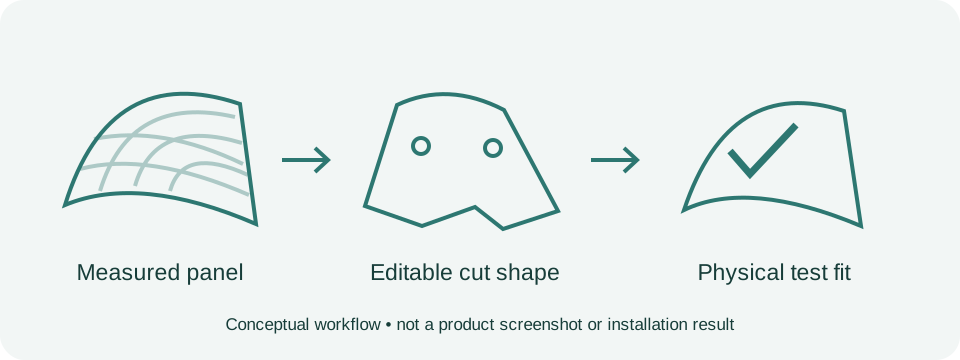
The process can be understood in five stages.
First, capture the actual panel. A handheld 3D scanner measures the part and saves a surface model. PPF Engine accepts STL, OBJ and PLY files. That means the scanner has to produce a measured 3D mesh—not just an ordinary photograph.
Next, decide what the film should cover. The installer chooses the boundaries, seam locations and whether particular edges should be covered flush or wrapped around. Those choices are part of the installation plan, not something a scan can decide on its own.
Then, turn the curved surface into a flat shape. PPF Engine's stated workflow flattens the selected area and displays how much the film would need to stretch or compress. A shop can use those warnings to rethink the shape before cutting expensive material.
After that, refine the cut. The installer can adjust the outline, add openings for details such as bolt pockets or badges, and place relief cuts where needed. The resulting full-size file can be exported as SVG, DXF or PLT, provided the shop's cutting software or plotter accepts the chosen format.
Finally, test the fit. The developer specifically advises making a test cut and checking it on the vehicle before cutting production film. A measured scan can help reduce guessing, but the actual fit still depends on scanning quality, film behavior and installer decisions.
The STEK Estonia RAM 1500 job: an example installers can picture
One of PPF Engine's most useful published examples involves a RAM 1500 with bolt-on fender flares at STEK Estonia.
The vehicle's factory panels were not the issue. The added flare had its own curves and nine recessed bolt openings. STEK Estonia supplied a scan of the flare, and PPF Engine's team turned it into a one-piece cutting template about 1,485 mm long and 435 mm wide. The company's account describes five relief notches and nine individually traced openings around the bolt pockets.
Why do those small openings matter? If film covers a deep recess without fitting into it correctly, it may bridge across the space. Cutting around the recess by hand can also put a blade close to a finished surface. A template that accounts for each opening before the film reaches the truck offers a different starting point.
The case study shows the cut film being fitted to the flare and describes the pattern as reusable for future jobs involving the same part. The developer reports roughly three minutes of processing for the pattern stage, but that should not be mistaken for the time needed to scan, prepare and install the film from start to finish.
There is a useful brand distinction here. STEK Estonia is the installation business featured in the case study. PPF Engine is offered by Andify OÜ. This is not evidence that PPF Engine is the same product as STEK EDGE, the separate STEK pattern-library platform, or that STEK globally has launched PPF Engine as its own software.
A second example: a BMW charging cap no standard pattern covered
On a BMW X3 30e, the difficult area was much smaller: a fender and charging cap for the plug-in hybrid version. PPF Engine's example shows three ways to prepare the cap's edges—stopping just short of the edge, allowing film to wrap around it, or using small corner cuts to help the film lay down.
The templates also account for the raised M badge, with an adjustable gap around it. This illustrates an important point: making a custom pattern is not only about getting the right size. Shops may want the same part cut differently depending on how they plan to install the film.
The published photos show fitting work on the part. They do not establish long-term edge performance or give a reason to skip an on-vehicle check.
What equipment would an installer need?
PPF Engine is intended for compatible Windows PCs and Apple Silicon Macs. The developer lists Windows 10 or 11, macOS 12 or later on M1-or-newer Macs, at least 8 GB of memory and 16 GB recommended.
A shop also needs a 3D scanner that can export a suitable mesh and a cutting workflow that can import the resulting vector files. The developer says it has actually tested a Shining 3D EINSTAR Rockit and EinScan Rigil scanners with a Graphtec FC9000 plotter. It lists other scanners and plotters as potentially file-compatible, which is not the same thing as verifying every device.
If a shop already owns a cutter but not a scanner, the price of the software is only part of the investment. Time spent learning to capture clean scans, especially on dark or glossy surfaces, matters too. A cutter locked to a closed pattern subscription may not accept outside files at all.
Price, availability and the questions worth asking
PPF Engine advertises a US$400 first-year presale license, with annual renewal at that same price for the original one-seat license. The company lists US$900 per year as its intended public price. The first year begins when access is delivered, presently estimated for December 2026. The payment is taken during the presale, there is no automatic renewal, and the company offers a full refund before access begins. Prices are in US dollars; applicable taxes are extra. Terms should be checked directly before purchasing.
That price may appeal to a shop that often handles custom parts, but the main calculation is not just the subscription fee. It is whether the shop can reliably scan the jobs it sees, make useful patterns and save enough time or material to justify the equipment and learning effort.
Before relying on the software for customer work, a shop should ask the developer to demonstrate its own missing-pattern example, confirm its exact scanner and plotter, and show a complete physical test fit. It should also ask how many attempts a difficult bumper takes, how long the entire job takes from scanning to install-ready cut, and whether its saved projects remain accessible if the license expires.
Will this replace ordinary PPF pattern software?
Probably not for routine vehicles already covered by a reliable pattern library. Pulling up a known template is usually simpler than measuring a familiar car again.
The more interesting possibility is a second workflow for the exceptions: modified trucks, custom bumpers, rare cars, fresh model changes and small parts that are easy to overlook. In those cases, the ability to build and keep a custom pattern may matter more than the size of someone else's catalog.
PPF Engine's first public test will be whether installers outside its development shop can reproduce the documented results on their own vehicles and equipment. If they can, custom pattern-making could become more practical for independent PPF businesses. Until then, the strongest evidence is the specific work the company has shown—and the limitations it openly describes.
Common questions about PPF Engine
Is PPF Engine available to download now? Not as of November 5, 2026. Presales are open; delivery is estimated for December 2026.
Do I need a 3D scanner? Yes, for the main workflow. The application uses measured 3D surface files, not ordinary vehicle photos.
Does it include a library of premade PPF patterns? It is positioned as a tool for making custom templates rather than a replacement for an established vehicle-pattern database.
Can it use my existing plotter? Possibly. The exported files use common formats, but the company has specifically tested a Graphtec FC9000. Ask about your exact model and software before buying.
Is it connected with STEK? The developer's case study features STEK Estonia, and Andify lists STEK Estonia among its clients. That does not establish PPF Engine as STEK's worldwide EDGE software or a STEK global product.
Sources and further reading
Sources checked November 5, 2026; rechecked November 6, 2026. This is source-based reporting, not an independent hands-on review.
- PPF Engine product overview
- STEK Estonia RAM 1500 case study
- BMW X3 30e charging-cap case study
- Compatibility and tested equipment
- Preorder legal terms
- Andify developer portfolio
- Separate STEK EDGE platform
- Scan-to-pattern workflow and test-fit requirement
Explore more PPF industry news and compare cutting-software options.
More details & sources
- Company demonstrations and case studies, not independently tested performance. Estimated access is not a confirmed release date.